Home / Work / Optym · RouteMAX
Case Study 02 — Behavioral Trust & Automation Adoption

Building Trust in Automation

In 2020, carriers were skeptical about letting RouteMAX's optimizer change their carefully planned routes. The feature was powerful — but felt opaque and irreversible. Six years later, every AI product team I talk to is living some version of this story: a capable system, a skeptical user, and adoption numbers nobody can explain. This case study is about what was actually wrong — and why the answer matters even more now.

18% → 52%
One-time → daily users, in 2 months
5,000+
Users across 3 clients
5 weeks
Study duration
Sole
Researcher & designer
Act I The Problem Wasn't Awareness

A button that could do all your work. Nobody used it.

In 2020, I watched a perfectly good automation fail. The algorithm was correct. The engineering was solid. The automation worked. The single-click "Optymize" button could plan a full day of delivery routes in seconds — work that took expert planners hours. And yet — only 18% of users ever tried it. Most never came back.

The organization's hypothesis was "awareness." More demo sessions, tutorial walkthroughs, explicit tutorials showing exactly how the algorithm worked. Still 18% (nobody watched, duh!). We claimed an 80% increase in operational efficiency — achieved only when users actually used this star feature. The product manager wanted more training. The engineering team wanted attribution data.

I pitched UX research as the path to an answer — not because I knew what the answer was, but because the existing hypotheses were downstream of the wrong question.

"The question was never 'why won't they use it?' The question was 'how can we build enough trust in this feature that makes users feel competent, efficient and supported at their job?'"

Planners in the P&D industry had spent years building expertise in a specific cognitive process: grouping shipments geographically, applying constraints from memory, drawing on pattern recognition built over years of operations. The Optymize button asked them to invert that entirely — input constraints, then wait for the algorithm to produce routes. Not a small change. A complete behavioral inversion.

The interface never explained this trade. It never named what it was replacing or why the replacement was trustworthy. It asked people to delegate expertise to a system without first building a relationship with that system. Nobody designed the bridge between the old workflow and this new transition.
Mental Model Inversion Old workflow planner groups shipments → routes planner in control New workflow planner inputs constraints → wait algorithm in control vs The gap between these = the mental model mismatch Not a design problem. A transition problem. Nobody designed the bridge.
What the quotes told us
The feature scored high on competence (the math worked) but low on predictability and confidence — users couldn't anticipate the impact of their choices, or recover easily if something went wrong.
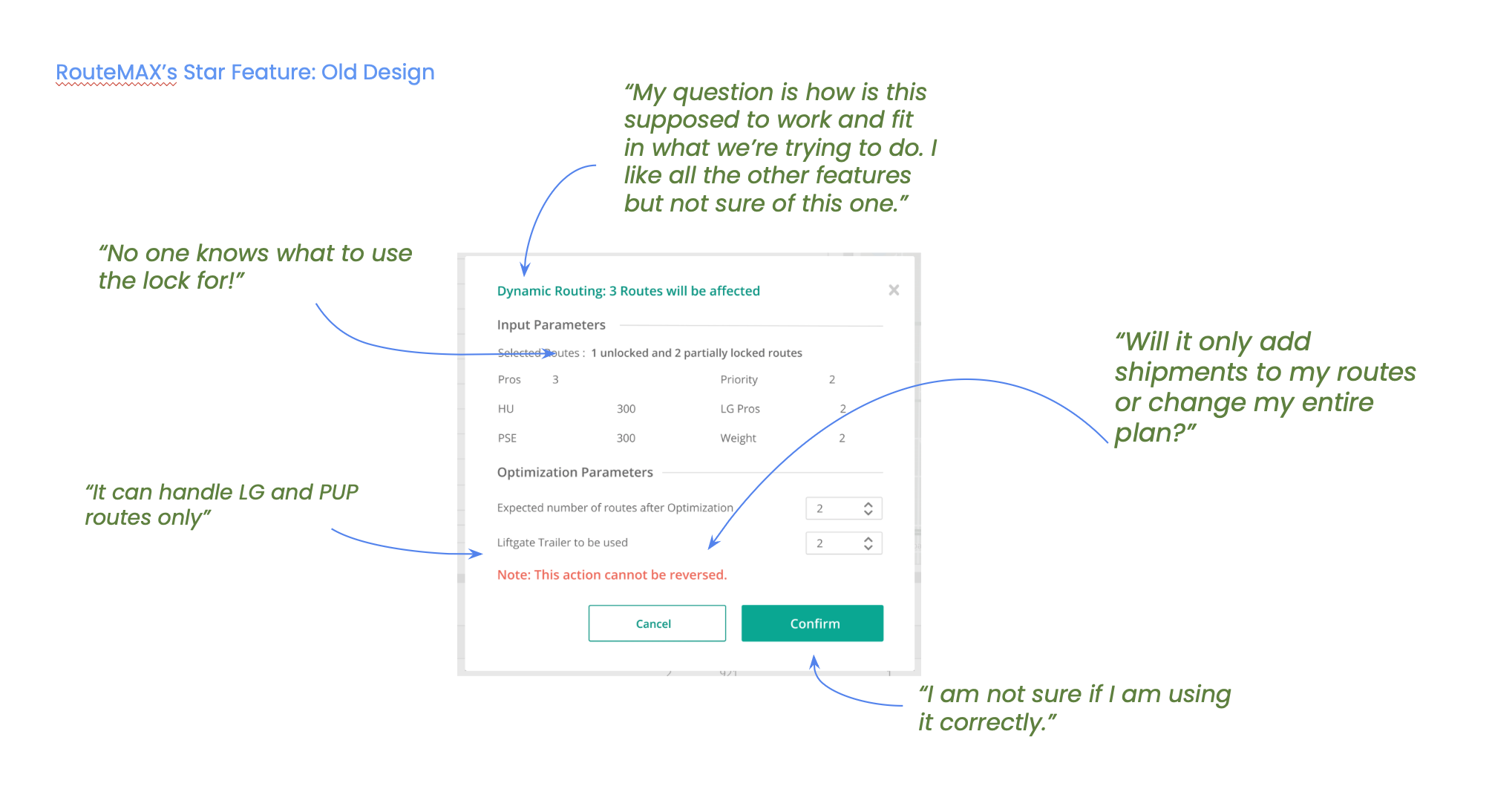
RouteMAX's star feature — the old design The original Dynamic Routing launch popup, annotated with skeptical user quotes: 'No one knows what to use the lock for!', 'Will it only add shipments to my routes or change my entire plan?', 'I am not sure if I am using it correctly.'
The original launch popup: inputs and a button, with no framing of what the automation replaces or why to trust it. A red warning — "Note: This action cannot be reversed" — did the opposite of reassurance.
Act II Defining Trust Before Measuring It
Defining Trust for this context 01. Reliance Do they accept the solution without heavy modification? 02. Transparency Does the experience explain how the algorithm thinks? 03. Comprehension Are labels and terms meaningful in their world? defined before any interviews
Why a diary study, and why real data?
A usability test on dummy data would only capture a response to the novelty of the feature — not its use. Real data and real daily time constraints were essential: the algorithm's output depends on the complexity of live route conditions, and we needed to see what happened when it met the actual messiness of the user's workday.

Two user types.
One structural failure mode.

Before any interviews, I defined what trust meant in this context — so the study could measure it rather than gesture at it: reliance, transparency, and comprehension.

The data surfaced two distinct patterns before research even started: non-users who had never tried the feature, and bounce users who tried it once or twice, then stopped.

Since this was a big bet for our product, I designed a three-phase study to capture both attitudinal and behavioral data:

  1. Cognitive walkthrough — to surface mental model assumptions
  2. 1-week diary study — using the feature with real operational data
  3. Post-discussion — clarifying diary entries with the user and engineering team together
Act III The Finding

Designing for trust, not just function.

Learning 1
Tutorials handled some of the change management challenge — but change management needs to be baked into the workflow design.
Non-users couldn't parse what the feature was even for. The popup that launched the feature didn't name what it was replacing or explain the concept of dynamic routing. Users were handed a key to a door nobody had introduced them to.
Learning 2
Lack of user control or major shifts in user mental models demand heavy designing for trust, not just function.
Bounce users had a different failure. The algorithm sometimes produced "extra routes" — a technical artifact of shipments that didn't fit clean geometric groupings. Users who encountered one extra route concluded the algorithm was unreliable and stopped using it permanently. Trust, once broken by a single unexplained output, requires twice the effort to rebuild.

The priority model shifted everything. At the end of the study, I asked users to rank the reasons they'd stopped using the feature. "Lack of awareness" — the organization's primary hypothesis — ranked near the bottom. Confusing interface and unexplained outputs ranked at the top.

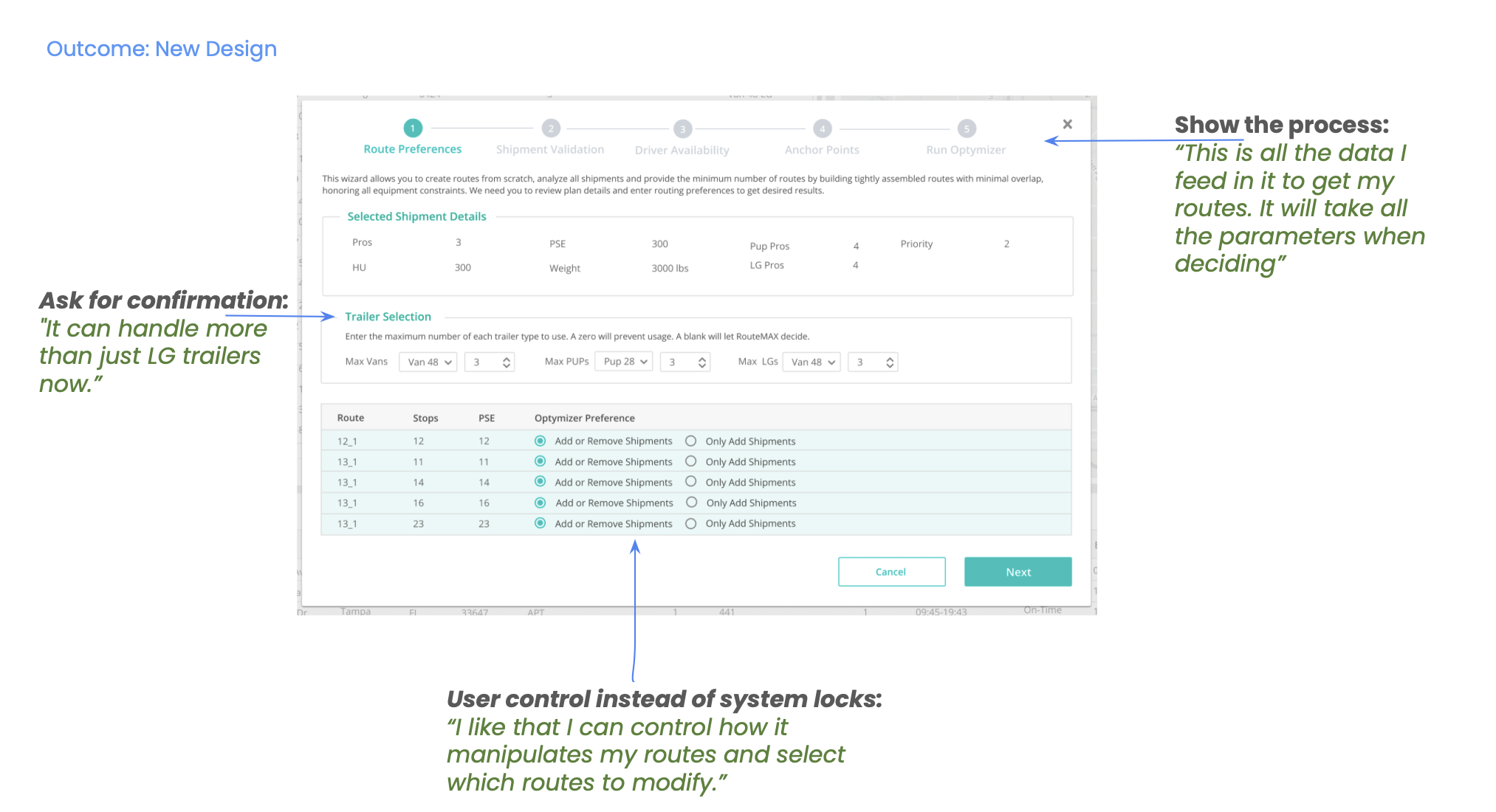
Outcome — the new design The redesigned Route Preferences wizard, annotated: a step-by-step tracker showing the process, explicit Trailer Selection for confirmation, and per-route optimizer preferences giving user control instead of system locks.
The redesign treated the popup not as a feature entry point but as a trust-building moment: it named what the automation replaced, situated it in the planner's existing workflow, and explained outputs the planner might find surprising before they encountered them.
What changedOld designNew design
Show the process, not just the outcome With minimal inputs, the user had no visibility into what the algorithm considers. Users had to trust a black box The step tracker matches their workflow. Users could see: "This is all the data I feed in to get my routes. It will take all the parameters when deciding"
Ask for confirmation, don't assume permission Other inputs were assumed from other data sources — users didn't know the system could handle more than LG Explicit "Trailer Selection" with dropdowns for Van, PUP, and LG trailers puts the user in control and clarifies what's considered
Give user control instead of system locks "No one knows what to use the lock for!" Per-route optimizer preferences: "Add or Remove Shipments" vs "Only Add Shipments"
Explain the scope of change "I am not sure if I am using it correctly" Clear step-by-step process showing exactly what happens at each stage
Remove fear, not just friction Red warning: "Note: This action cannot be reversed" No scary warnings — the wizard itself creates reversible checkpoints
§ Impact
What the redesign moved
Adoption: 18% one-time users → 52% daily users in 2 months post-redesign
North star achieved — led to an industry press release and client expansion
Mental model migration framework became standard for all subsequent automation features — applied to 3+ future modules
Client-led data correction initiative — findings surfaced a data quality issue outside our scope, enabling better algorithm outputs
"The software is intuitive and most planners were able to understand the majority of features with limited training." — Patrick Sugar, VP Linehaul & Engineering, Saia
Adoption over time 18% one-time redesign 52% daily +2 months 0% 50% north star ✓
Act IV The 2020 Lesson That 2026 Can't Forget

From route optimization to AI: in 2020, we learned that alongside algorithmic progress, what changed was the relationship between the human and the system. In 2026, we're making the same mistakes at scale with AI — only with higher stakes.

The new AI trust gap: same patterns, new packaging.

2020 problem2026 AI equivalent
"No one knows what to use the lock for""I don't know when to trust vs. verify the AI's output"
"Will it change my entire plan?""Will this AI agent rewrite my whole codebase?"
"It can handle LG and PUP routes only""This AI only works for standard cases, not my edge cases"
"This action cannot be reversed""I don't know what the AI just changed"
"I am not sure if I am using it correctly""I don't know if my prompt is good enough"

Five principles for building trust in AI automation.

Based on this work — and validated by every AI product failure I've seen since — a framework for designing trustworthy automation:

Design principleRouteMAXAI products
Calibrate trust, don't just increase it The goal wasn't blind reliance; it was appropriate trust — users understand when to rely on automation and when to override it Trust that's too low leads to bypassing; too high leads to over-reliance. "Trust calibration" aligns expectations with actual system reliability. And the Trust Tax doesn't just cost an interaction — it can cost a user
Make the process visible, not just the output A step-by-step progress wizard clarifying which routes would change, and under what conditions, turned a scary one-click change into a predictable workflow AI systems must show their work — their "thinking," what constraints were applied and what was excluded
Design for reversibility and safe failure Moving away from "this cannot be reversed" toward safer, incremental changes lowers the cost of experimenting with automation Undo, rollback, and audit trails are now core UX patterns for autonomous agents and high-stakes AI tools
Expose the system's state, not just results Showing intermediate steps — route preferences, capacity constraints, anchor points — let users "see inside" the optimizer Confidence indicators, data sources, and flagging incomplete or approximate results reduce ambiguity and avoidance
Preserve and signal user agency Users could decide which routes to modify, choose optimization preferences, and confirm changes before they took effect Suggestions over actions, clear separation between AI-generated and user content, and explicit confirmation for high-impact actions
Coda The Bigger Learning

Automation is not a feature you ship. It's a relationship you build.

The organizations that win the AI transition won't be the ones with the best models. They'll be the ones who design the best bridges — who understand that automation is not a feature you ship, but a relationship you build.

"Priming users to migrate their mental model is more important than proving the new system is correct. Accuracy is the easy part right now."

Designing RouteMAX's dynamic routing experience forced a mindset shift: treat automation not as a magic optimizer, but as a collaborator whose decisions must be legible, controllable, and recoverable. Those same principles now underpin responsible AI interfaces — from copilots in enterprise dashboards to autonomous agents in logistics and operations.

Next Study

Turning Sales Conversations into Research Signal Using AI

Meta · Instagram Ads →